DJ-500E – – frequency range adaption – Part1
The radio can be reprogrammed to different frequency ranges using a key combination.
Caution: On newer devices (from late 2017 onwards?), reprogramming via key combination no longer works! There is software from Alinco (the so-called O-Setup software) that is not freely available. It is best to ask your dealer.
-
Switch the device off.
-
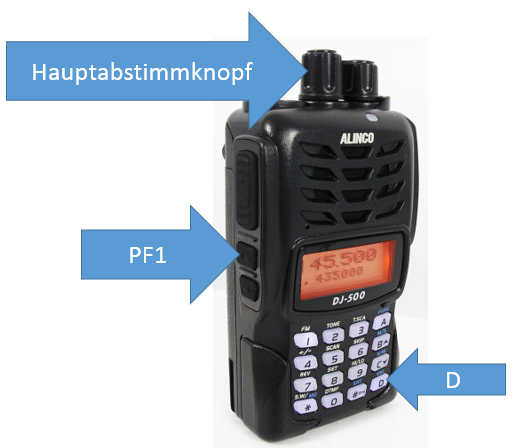
Press and hold the PF1 and “D” buttons.
-
Switch the device on and wait until the setting “Modw” appears on the display. Then release the buttons.
-
Set the desired mode using the main tuning knob.
-
Press the “D” button to exit the setting mode.
-
Switch the device off.
-
Switch the device back on.
| Mode | Variante | 2m RX [MHz] | 2m TX [MHz] | 70cm Rx [MHz] | 70cm TX [MHz] |
|---|---|---|---|---|---|
| Mode 1 | DJ-500TB | 136 - 174 | 136 - 174 | 400-480 | 400-480 |
| Mode 2 | DJ-500TB | 136 - 174 | 144 - 148 | 400-480 | 420-450 |
| Mode 3 | DJ-500TB | 144 - 146 | 144 - 146 | 430-440 | 430-440 |
| Mode 4 | DJ-500TB | 136 - 174 | 136 - 174 | 400-523 | 400-523 |
read more posts