Alice-DJ500 – a channel editor software for Alinco DJ-500 T/TB/E/EX radio
The DJ-500 is a nice handheld radio and the programming software also works quite well. However, I find two things in the software that need improvement
You cannot move the channels in the channel list up/down, so it is not so easy to restructure the channels In the overview, the „ScanSkip“ field is not visible, i.e. you have no direct overview of which channels are being scanned and which are not This is exactly what the Windows program „Alice-DJ500“ is intended for. In principle, the program has only 2 features
Moving channels using the Up / Down buttons Select / deselect channels for the scan list using the ’s‘ key or context menu (right mouse click) Several channels can be edited at the same time (multiple selection via Ctrl or Shift + mouse click). A third feature was added since v1.1
If the frequency range is changed, the channel list will be completely deleted and cloning will not work with the „old“ file. The Alinco program notices that the file and the device do not match. Now it’s possible to change the radio type inside this software so you can use the same channel list on different radio type configurations (different frequency ranges) Handling
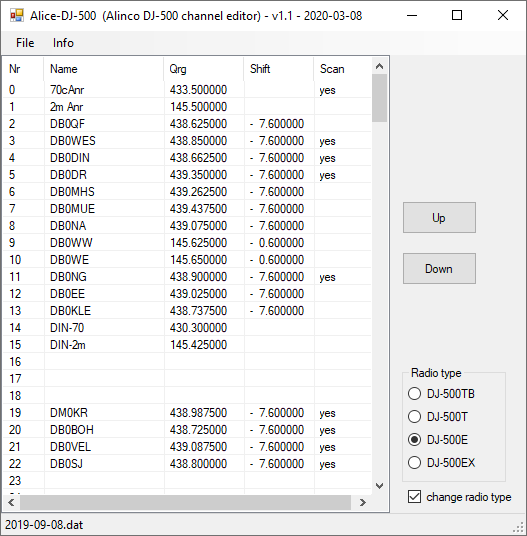
Open *dat file edit the channel list change the radio type if you want to use the list for different DJ-500 type save file program file to radio via original Alinco software
Download: Alice-DJ-500-v1_1.zip